Why Shelvio exists

The gap between finding and listing is where good inventory gets stuck.

Shelvio is built for that messy middle: when the item is in your hands, the details are fresh, and you need to keep moving before the pile takes over.

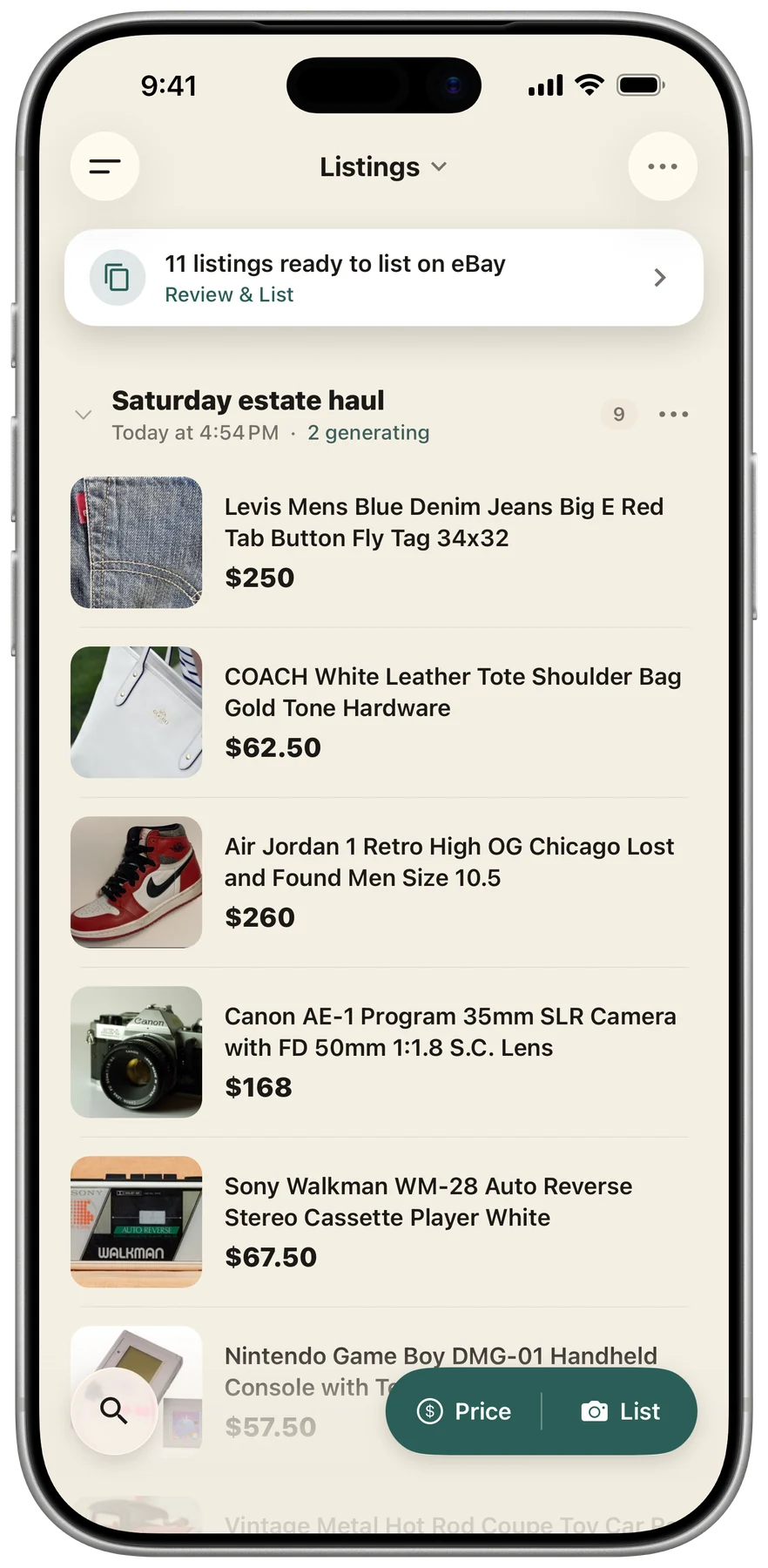
Shelvio listings dashboard showing a batch of item drafts ready to review.

Kept together

  • 5 photos
  • Condition noted
  • Shelf B-12

One item record, from the first photo to the final number.

Haul Listed Sold
The work before the listing

Most listing tools begin after the hardest part.

A listing form assumes the photos are sorted, the measurements are written down, the flaws are remembered, and the right details still belong to the right item.

Real reselling is rarely that tidy. It happens across thrift hauls, estate tables, garages, storage units, and camera rolls full of nearly identical photos.

Shelvio starts earlier. Capture the item while you know it, then let the same record travel with it through the draft, marketplace, storage shelf, sale, and item-level profit.

  1. 01

    Capture it while you know it

    Keep the right photos, measurements, flaws, and spoken details together from the beginning.

  2. 02

    Turn context into a draft

    Shelvio organizes what you captured into a listing you can review instead of a blank form to fill out.

  3. 03

    Carry the record through the sale

    Review the draft, choose a marketplace publishing workflow, then track where it is and what you made.

What guides the product

The workflow should protect your momentum and your judgment.

Fast enough to keep up

Capture one item, tap Next Product, and reach for the next. The draft can start while the batch keeps moving.

Clear enough to trust

Every listing stays a draft until you review it. You can edit the details, choose the price, and decide where it goes.

Useful after it is listed

Cost, source, storage, marketplace status, sale, fees, shipping, and item-level profit stay attached to the same item record.

Shelvio batch camera ready to capture photos and notes for one item.
Shelvio reports showing sales, fees, and item-level profit for listed inventory.
One continuous record

Do the work once. Keep the value of it.

The photos and details that make a strong listing are also the beginning of an inventory record. They should not disappear once the listing goes live.

Shelvio keeps the operational side of reselling connected to the item: where it came from, where you put it, where it is listed, what it sold for, and what was left after fees.

Handle the item once. Keep what you know. Let the record travel with it.

Your next item is enough to start

Turn what is in front of you into something ready to sell.

Download Shelvio to start an eligible free trial through the App Store or Play Store: 3 days on Weekly or 7 days on Monthly and Annual. The trial includes full mobile and web access. Subscriptions started on the web through Stripe begin immediately with no trial.